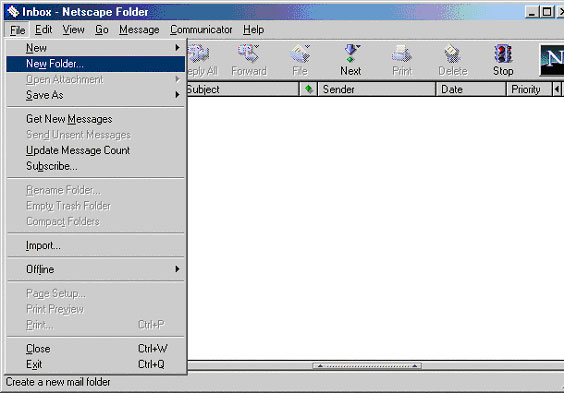
1. Open Netscape Messenger and click on File then New Folder…
|
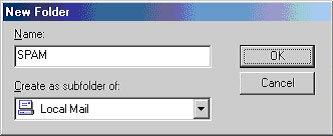
2. Type in a name for the folder where all the Spam mail is going to be sent as your mail arrives, eg. SPAM and click OK.
 |
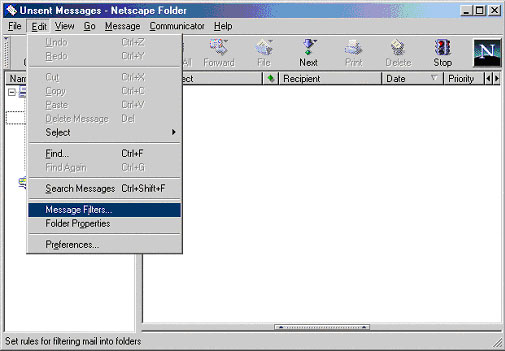
3. Click on Edit, then click on Message Filters…
 |
5. Click on the New button. In the top box type in SPAM. In the box to the right of the one which says contains type in *****SPAM*****. To create the * on each side of the word SPAM hold your Shift key down on your keyboard and press the number 8 key.
In the box to the right of the one which says Move to folder click on the  and select SPAM, or what ever you named the folder. Your window should look identical to the one below.
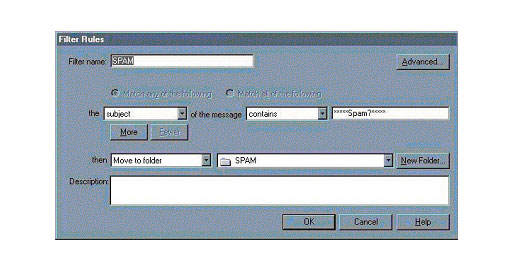 |
5. Click on OK twice. All your incoming mail with *****SPAM***** in the subject line will be sent to your SPAM folder.